

Redshift Render Farm - Drop & Render is an Official Maxon Partner.
We provide seamless Redshift integration across Cinema 4D and Houdini. With over 60 Redshift versions supported and automatic version matching, you never need to change your local setup before submitting. Our platform fully supports AOVs, Proxies, and all essential Redshift features, with all farm licensing covered. Learn more about how we make Redshift rendering faster and easier below.
Supported software
Our system automatically detects your exact Redshift version and recreates that environment on the farm before your job starts. With supported versions from legacy releases to the latest builds, you never need to change your local setup before submitting.
We support over 60 Redshift versions, from legacy 2.x releases through to the latest 2026 builds, across Cinema 4D, Houdini and Blender.
Nothing found!
Redshift 2026.9.0
keyboard_arrow_down
Redshift 2026.9.0
keyboard_arrow_down
Redshift 2026.8.1
keyboard_arrow_down
Redshift 2026.8.1
keyboard_arrow_down
Redshift 2026.8.0
keyboard_arrow_down
Redshift 2026.8.0
keyboard_arrow_down
Redshift 2026.7.1
keyboard_arrow_down
Redshift 2026.7.1
keyboard_arrow_down
Redshift 2026.7.0
keyboard_arrow_down
Redshift 2026.7.0
keyboard_arrow_down
Redshift 2026.6.2
keyboard_arrow_down
Redshift 2026.6.2
keyboard_arrow_down
Redshift 2026.6.1
keyboard_arrow_down
Redshift 2026.6.1
keyboard_arrow_down
Redshift 2026.5.0
keyboard_arrow_down
Redshift 2026.5.0
keyboard_arrow_down
Redshift 2026.4.0
keyboard_arrow_down
Redshift 2026.4.0
keyboard_arrow_down
Redshift 2026.3.1
keyboard_arrow_down
Redshift 2026.3.1
keyboard_arrow_down
Redshift 2026.3.0
keyboard_arrow_down
Redshift 2026.3.0
keyboard_arrow_down
Redshift 2026.2.1
keyboard_arrow_down
Redshift 2026.2.1
keyboard_arrow_down
Redshift 2026.2.0
keyboard_arrow_down
Redshift 2026.2.0
keyboard_arrow_down
Redshift 2026.1.1
keyboard_arrow_down
Redshift 2026.1.1
keyboard_arrow_down
Redshift 2026.1.0
keyboard_arrow_down
Redshift 2026.1.0
keyboard_arrow_down
Redshift 2026.0.0
keyboard_arrow_down
Redshift 2026.0.0
keyboard_arrow_down
Redshift 2025.6.0
keyboard_arrow_down
Redshift 2025.6.0
keyboard_arrow_down
Redshift 2025.5.0
keyboard_arrow_down
Redshift 2025.5.0
keyboard_arrow_down
Redshift 2025.4.2
keyboard_arrow_down
Redshift 2025.4.2
keyboard_arrow_down
Redshift 2025.4.1
keyboard_arrow_down
Redshift 2025.4.1
keyboard_arrow_down
Redshift 2025.4.0
keyboard_arrow_down
Redshift 2025.4.0
keyboard_arrow_down
Redshift 2025.3.0
keyboard_arrow_down
Redshift 2025.3.0
keyboard_arrow_down
Redshift 2025.2.2
keyboard_arrow_down
Redshift 2025.2.2
keyboard_arrow_down
Redshift 2025.2.1
keyboard_arrow_down
Redshift 2025.2.1
keyboard_arrow_down
Redshift 2025.1.1
keyboard_arrow_down
Redshift 2025.1.1
keyboard_arrow_down
Redshift 2025.0.2
keyboard_arrow_down
Redshift 2025.0.2
keyboard_arrow_down
Redshift 2025.0.1
keyboard_arrow_down
Redshift 2025.0.1
keyboard_arrow_down
Redshift 3.6.04
keyboard_arrow_down
Redshift 3.6.04
keyboard_arrow_down
Redshift 3.5.13
keyboard_arrow_down
Redshift 3.5.13
keyboard_arrow_down
Redshift 3.5.08
keyboard_arrow_down
Redshift 3.5.08
keyboard_arrow_down
Redshift 3.0.54
keyboard_arrow_down
Redshift 3.0.54
keyboard_arrow_downEvery Redshift version supported
300+ intelligent project checks
So your project will always work perfectly.
AOV support
Tile rendering
One click project submission
RTX
ON
RTX
ON
Direct file output
No need to wait around - each completed frame is automatically downloaded straight to your hard drive.
Redshift Proxies
Our Cinema 4D plugin
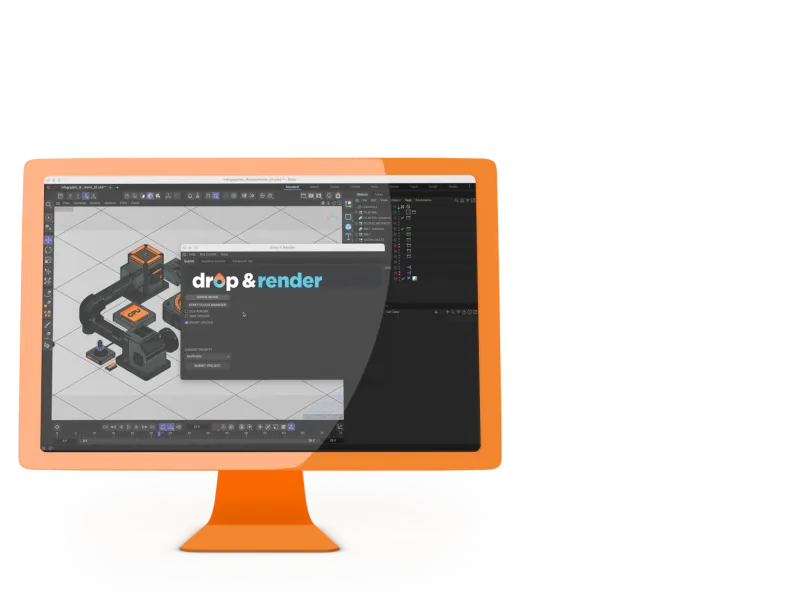
Our in-app plugin for Cinema 4D makes submitting your Redshift jobs simple and seamless. No need to leave your application, just set up your project and let our plugin handle the rest. It automatically scans your scene, performs advanced Redshift-specific checks, and ensures everything is configured correctly.
With full support for your chosen Redshift version and no need for asset remapping, rendering with Drop & Render feels just like working locally, but with the power of our render farm behind you. We take care of every detail, so you can focus on creating.
Our Blender add-on
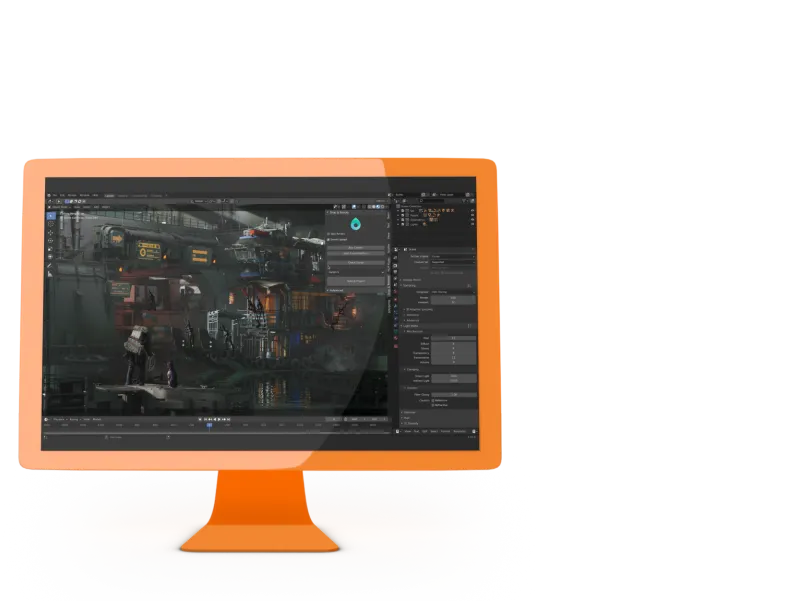
Our Blender add-on is designed to integrate effortlessly into your workflow, offering powerful rendering capabilities right from within Blender. With just a few clicks, you can submit your projects directly through the add-on, without ever leaving the application.
Our tool automatically checks your project to ensure all settings and assets are in place, so you can render with confidence. Whether you're working with still images or animations, our platform supports all major Blender features and will fit right into your workflow.
Our Houdini plugin
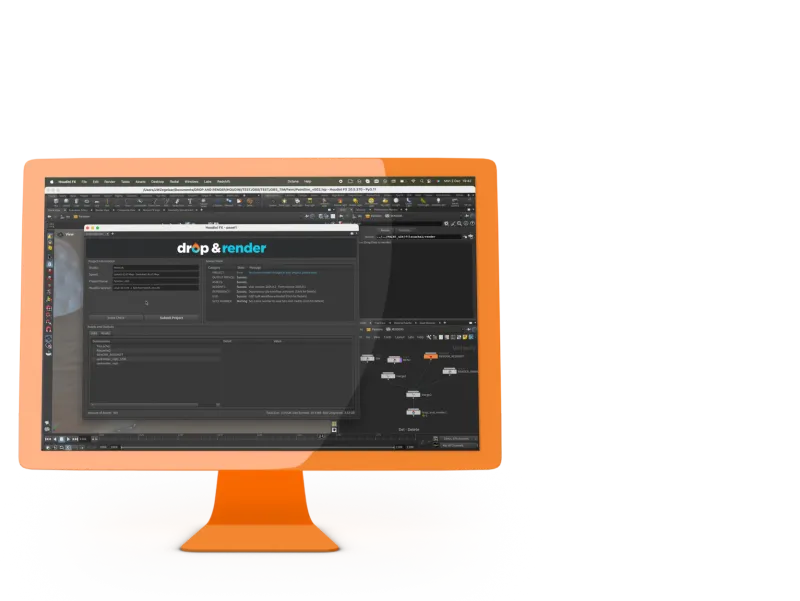
Our Houdini plugin offers unparalleled support for Redshift, designed to streamline your workflow like never before. With the Drop & Render HDA, you can connect all your Redshift nodes and render every shot in your project with a single click.
Built with extensive support for Redshift features, our platform is crafted to meet the demands of even the most complex Houdini workflows. Drop & Render makes your rendering process faster, easier, and more efficient.
Licensing fully covered
As an official Maxon partner, all Redshift licensing on our render farm is included. No render node licenses, no seat management. Your local license is all you need.
GPU farm built for Redshift
Your job runs across 100 to 200 dedicated GPUs simultaneously. A 200-frame animation finishes in roughly the time of a single frame. Overnight renders done in under an hour.
Automatic version matching
Our plugin detects your exact Redshift version and replicates it on the farm. Over 60 versions supported, from legacy releases to the latest builds. No need to upgrade before submitting.
Submit from Cinema 4D
Open your project, run the scene check, hit submit. Our plugin collects all assets and uploads everything automatically. Completed frames download straight to your output path.
Submit from Houdini
Our HDA connects to your Redshift render nodes directly. Hit submit and the farm respects your full dependency chain, delivering outputs to the paths defined in your ROPs.
Full AOV support
All Redshift AOV outputs are rendered exactly as configured. Each pass lands in the output location you defined, with no extra setup required. Works identically across Cinema 4D and Houdini.
Proxies handled automatically
Our upload system detects all Redshift Proxy files and uploads them alongside your project. No manual path remapping required. Any issues are flagged before submission.
300+ checks before every job
Our plugin runs over 300 scene checks before any Redshift job starts, catching missing textures, unsupported paths, and proxy problems upfront. No wasted credits, no failed renders.
Get started with Redshift
Our Quick Guide video for Redshift shows you how to start rendering with us in just 2 minutes. After that, it’s just like rendering on your own machine - except a whole lot faster!
Related FAQs
Got questions about submitting your Cinema 4D projects? Check out our most frequently asked questions here.
Do I need my own Redshift license to render on the farm?
How do I submit a Redshift project to the render farm?
How fast will my Redshift project render on the farm?
Which 3D applications can I use with Redshift on your render farm?
Which Redshift versions does Drop & Render support?


Supported software
Company details
We'll start you off with €25 credits!